Start here, if you read nothing else
That's 420 labels — enough for 300 items with 120 spare for the ones you get wrong. No gun, no cutting, no new hardware. Print a sheet, peel, stick, scan. If your group has a cupboard with 300 props and tubs in it, that's a Saturday afternoon and twenty-three dollars.
Everything below is for when that isn't enough — costumes that get washed, items that live in a damp shed, or a wardrobe big enough that you want labels on demand.
The one rule that matters
A permanent adhesive label belongs on a case, a flat, a rostrum, a tub that keeps its identity for years. It is wrong on anything borrowed or hired — you damage someone else's property taking it off — wrong on anything repurposed, like a tub relabelled every season, and wrong on fabric, which wants a hanging tag rather than a sticker.
We tested this by hand. The permanent polyester labels survived water, could not be torn, and were extremely hard to remove. That is a feature and a warning in the same sentence.
What it costs, all three ways
| Route | To start | Per tag after | Best for |
|---|---|---|---|
| Adhesive labels | $22.99 | $0.055 | Cases, tubs, flats, rostra — and your first 300 items |
| Card tags | $74.51 | $0.015 | Costumes, anything washed or dry-cleaned |
| Roll printer | $204.00 | $0.077 | High volume, or a size no A4 sheet gives you |
In one line: labels are cheapest to start, card tags cheapest to run, and the roll printer is dearest at both ends. That isn't an argument against the printer — printing one label on demand at any length you like is worth real money once you're tagging weekly — but a group doing 300 items once a season should buy the $22.99 pack and stop there.
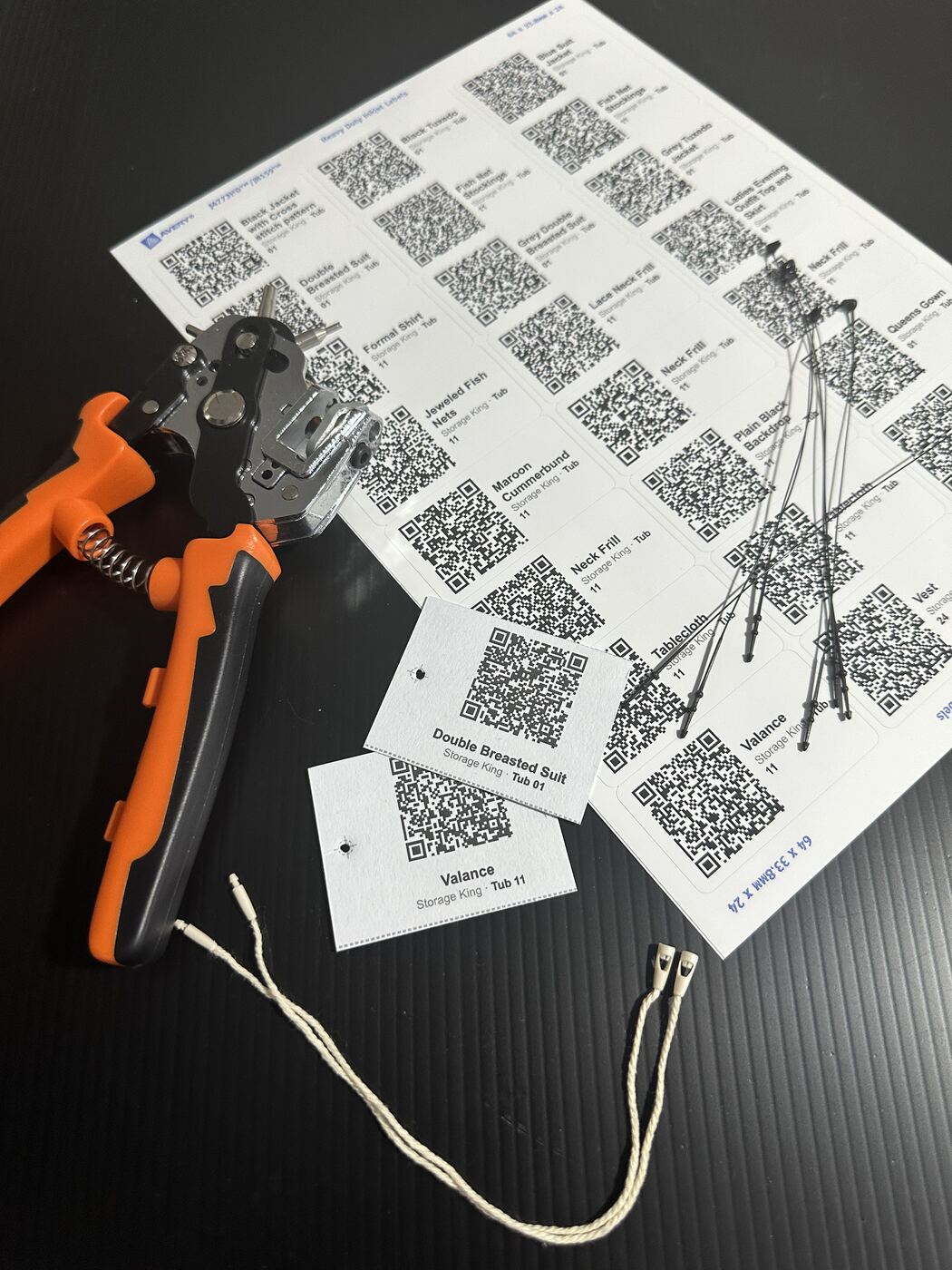
Route 1 — Adhesive labels
For anything with a hard surface. Four sheets are supported and they're all the same job: choose the template in GhostLight, print, peel, stick.
| Template | Part | Size | Per sheet | Pack | Price | $/label |
|---|---|---|---|---|---|---|
| L7160 | 952000 | 63.5 × 38.1mm | 21 | 420 | $22.99 | $0.055 |
| L7159 | 959418 | 64 × 33.8mm | 24 | 240 | $13.60 | $0.057 |
| L7163 | 959417 | 99.1 × 38.1mm | 14 | 140 | $13.60 | $0.097 |
| L7163 removable | 959046 | 99.1 × 38.1mm | 14 | — | — | For tubs you relabel |
Buy 952000 (L7160). Cheapest per label, and one pack covers 300 items with spares instead of making you buy two or three.
Pay the extra for 959417 (L7163) if your names are long. 99mm of width fits "Ensemble — Act 2 ball gown, green, size 14"; 63.5mm doesn't. It also carries the coarsest QR of the four, which helps in a dim shed or on an older phone. The trade: $40.80 against $22.99 to cover 300 items, because you need three packs instead of one.
Paper or polyester?
Paper is fine for a tub in a dry cupboard. Polyester is waterproof, tear-proof and carries a much stronger adhesive — worth it on anything that lives in a shed, gets wet, or gets handled by a crew in a hurry.
Which polyester you buy depends on your printer, so check that first.
| Part | Size | Printer | Pack | Price | $/label | 300 items | |
|---|---|---|---|---|---|---|---|
| Inkjet | 936069 / J4773 | 64 × 33mm | inkjet only | 240 | $60.72 | $0.253 | $121.44 |
| Laser | 959427 untested | 63.5 × 38.1mm | laser only | 105 | $20.77 | $0.198 | $62.31 |
| Laser | 959426 untested | 99.1 × 38.1mm | laser only | 70 | $20.77 | $0.297 | $103.85 |
The everyday paper sheets print on laser and inkjet both, so for ordinary labels it makes no difference what your group owns. The durable ones split down the middle — 936069 is inkjet only (the J in J4773 is Avery's inkjet line), the 9594xx series is laser only. Buy the wrong one and you'll find out when it jams or melts.
One naming note: Avery sell 936069 as "Heavy Duty Waterproof Labels — Fridge, Freezer & School Safe Stickers". Nobody searches for "936069", so that's the name to look for on a shelf.
Route 2 — Card tags
For costumes, and anything that gets washed or dry-cleaned. No adhesive survives a wash. A tag on a pin does, because it comes off before the wash and goes back on after — which is the entire point, and the first thing a wardrobe volunteer will ask you.
GhostLight prints a sheet of tags, you cut them out, punch a hole and put them on with a tagging gun, the same way a shop does.
| Item | What we use | Price |
|---|---|---|
| 200gsm A4 card | Rainbow A4 200gsm drawing cartridge, 250 sheets. Any brand — uncoated is fine, tested, scans. | $30.53 |
| Tagging gun | Generic gun + 1000 × 50mm barbs + hard case. The whole gun route in one purchase. | $18.99 |
| Short pins | 1000 × 10mm plastic fasteners. Our default. | $8.39 |
| Snap-lock loops | 200 × 200mm loops. No gun needed, and no hole made. | $10.99 |
| Belt punch | Revolving punch plier, 6 dies — we use the 2.5mm. Not an office punch. | $24.99 |
| Laminating pouches | A4 clear, 100 pack. Optional. | $33.00 |
| Clear tape | Greenhouse repair tape, 80mm wide. Optional, and it covers a whole tag. | $16.99 |
| Laminator | Ours has no brand on it and is over ten years old. Whatever you've got, or borrow one. | — |
One $30.53 box is 4,500 tags at 18 to a sheet — your whole wardrobe and the next dozen you'll ever have. Card doesn't go off. Avery sell pre-punched gift tags that do the same job for $132 a 300. We are not exaggerating that figure.
Which pin length
The needle only makes the hole — the plastic crossbar is pushed down the inside of it and out the far side. So pin length has nothing to do with the gun. Any length works in any needle. What must match is the gauge: standard pins need a standard needle, fine pins need a fine needle, and mixing them jams it.
| Length | Where it goes |
|---|---|
| 10mm | Straight through a care label or seam allowance — the tag sits flush |
| 50mm | The tag hangs — round a thicker hem, or through a buttonhole |
| 200mm (snap-lock) | Round a hanger. No gun, and no hole in the costume at all |
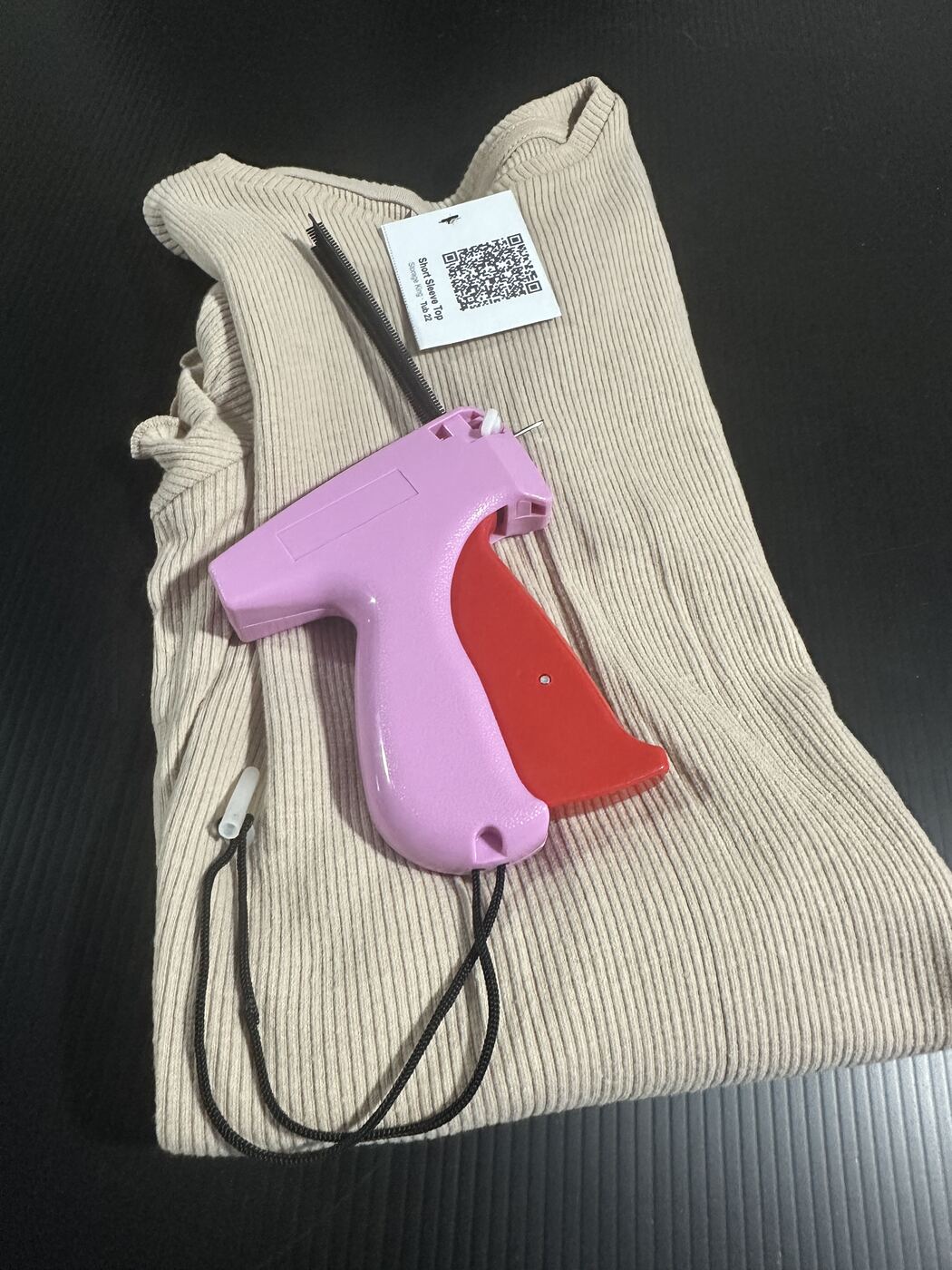
You are putting a permanent hole in a costume
For delicate, vintage, borrowed or hired pieces, don't use a pin at all. Use a 200mm snap-lock loop round the hanger or through the care label. Nothing is pierced. It costs about 5c a tag instead of 1c and it's worth every cent on a costume you can't replace.
Use a belt punch, not an office punch
A revolving punch plier does a whole stack in one squeeze where an office punch does one tag at a time. More importantly the hole is the right size: we use the 2.5mm die, and a plastic pin's head cannot pull back out through a 2.5mm hole. It works its way out of a 6mm one soon enough. An office punch also has a fixed throat stop that forces the hole about 12mm in from the edge, which is tag width you don't get back.
GhostLight reserves a 6mm strip at the edge of each tag with a crosshair at the hole centre. The strip exists so the hole never goes through the QR — a hole through a QR is a dead tag.
How it goes
- In GhostLight, choose Plain A4 paper (cut it yourself) and turn the punch hole on.
- Print, then cut along the guides.
- Punch through the crosshair in the reserved strip.
- Laminate or tape if the item gets handled hard. Optional.
- Attach with the gun through the punched hole.
Cutting is the slow bit — but it's an evening, not a weekend
Cutting is the only tedious step in the card route. Laminating is quick; cutting is what you'll feel.
A sheet laminated and cut into 18 finished tags, properly trimmed, takes us under five minutes. That's 17 sheets for 300 items. One evening in front of the telly.
If you want it faster or neater:
- An A3 rotary trimmer with a clamp is the upgrade. Not because it's quicker — it isn't, it takes fewer sheets per pass — but because every cut lands where you aimed it. A cut that wanders 2mm into the QR makes a tag that won't scan, and that undoes the whole point of the reserved strip.
- A print or copy shop might guillotine a stack for you on an industrial machine, and if yours does it'll be faster and squarer than anything you'll manage at home. Treat that as a possible alternative rather than advice: ring and ask before you drive anywhere. Print counters list services online that the branch nearest you doesn't actually offer. We haven't priced it anywhere.
- Don't buy a cheap lever guillotine. See the bottom of this page.
What to expect from a tag
Retention is equivalent to a retail garment tag: it takes deliberate force to pull out, and it will occasionally come out after rough handling. That's the right benchmark, and arguably the right behaviour — a pin that never releases tears the costume when something snags, and failing at the tag is the cheap failure. Expect to re-tag the odd item after a busy season, the same as a shop re-tags stock.
Route 3 — Brother QL-800 roll printer
For volume, or when you want a label size no A4 sheet will give you.
- Printer: Brother QL-800 — $157.00
- Tape: DK-22205, 62mm continuous paper, 30.48m — $47.00
At the recommended 50mm length that's about 609 labels a roll, 7.7c each — slightly fewer in practice, because the printer adds a feed margin between labels.
Set the media size in the printer's own dialog first, then match the length in GhostLight. The driver decides the tape size; GhostLight only tells the browser what the driver is already doing. Out of step and the label gets scaled to fit, which ruins the QR.
Making a tag last
These aren't five prices for the same thing. Each rung buys something different.
| Finish | Cost | What it actually gets you |
|---|---|---|
| Bare card | $0.007 | Nothing. Indoor, dry, handled gently. |
| Laminated | $0.025 | Rigid, rub-proof, UV-shielded — not waterproof at the cut edges |
| Clear tape over the top | $16.99/roll | Fully sealed, including the edges |
| Paper label | $0.055 | Dry cupboard only |
| Polyester label (laser) | $0.198 | Waterproof, tear-proof, permanent adhesive |
| Polyester label (inkjet) | $0.253 | The same, on an inkjet |
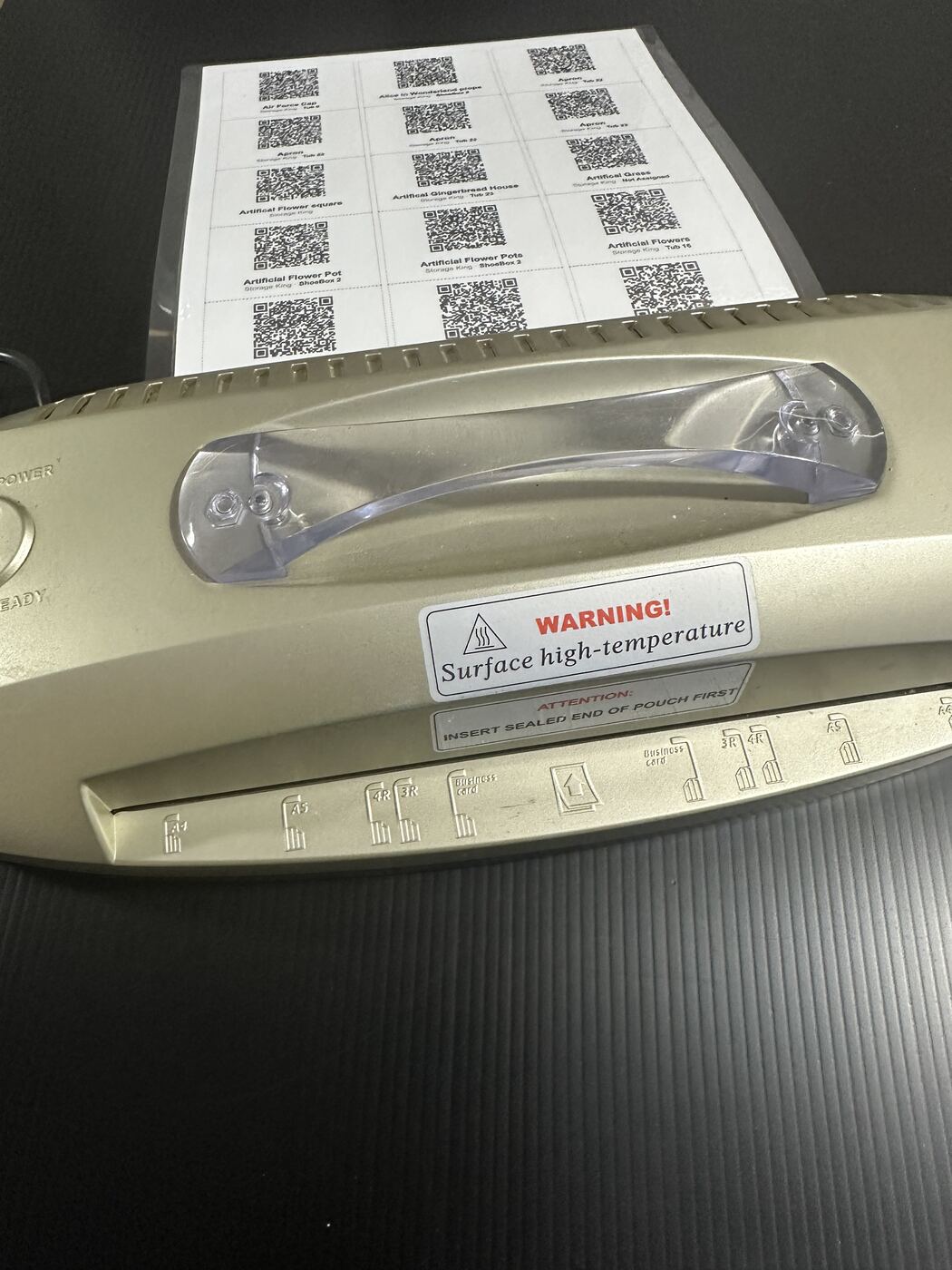
The laminate catch: every cut through a laminated sheet goes straight through the seal, so a cut card is protected, not waterproof. It's rigid and rub-proof and the print won't scuff, but water can wick in from a cut edge. Clear tape over the top is what closes that — and at 80mm wide, one strip covers a whole tag with sealed margin on both sides, in a single pass and no seam.
We've given the tape a price per roll rather than per tag because we've barely dented ours. What we can tell you is what it sticks to: card, plastic, wood and paper mache, all tested, all held. That last one matters more than it sounds — a prop store is full of paper mache, and it's exactly the surface a normal sticker gives up on.
On matte versus gloss: only the outermost layer governs reflection. A matte pouch under glossy tape gives you a glossy surface, which is the one that counts. Specular reflection is real, but it matters for fixed-mount scanners that can't change angle — a person holding a phone tilts it until it reads, and that's the end of it. Matte removes the fiddle; gloss costs you a second of wrist movement. Both have been scanned successfully here.
What scanning is actually like
Tested in a real storage unit, in dim light, on a phone.
Up close, in poor light, every tag and label on this page scans first time. That's the case that matters, because it's what a volunteer standing at a shelf is actually doing.
At a distance you'll need to zoom in — exactly as you would reading a QR code on a television from across the room. That's not a flaw in the tag; it's how cameras and QR codes work. A 30mm code simply doesn't resolve from five metres, no matter who printed it.
You don't have to work any of this out. Pick Plain A4 paper (cut it yourself) and GhostLight tells you what you're getting before you print — 18 per sheet, QR 30.4mm. That's the same code size as the Avery labels, and the exact figure we printed and scanned to set our floor in the first place.
Two things follow that are worth knowing. The QR is the same size whether you print tags or labels — 18 card tags to a sheet and 24 Avery labels to a sheet carry an identical code, because the layout takes the space out of the text area, not the code. And tag height is what buys scan reliability, not tag area: the code is square and sized against the tag's short dimension, so if you ever go hunting for a custom size, that's the dimension to protect. Width buys room for a long costume name; height buys a code that reads in a dim shed.
Three numbers on a packet that don't mean what you think
Possibly the most useful thing on this page, and it applies whatever you end up buying. Every one of these caught us out.
1. Sheet capacity on a trimmer is quoted at copy-paper weight
"8 sheets" means 8 sheets of 70–80gsm, and almost no manufacturer says so. Divide by about 2.5 for 200gsm card. Our 8-sheet guillotine is a 3-sheet guillotine for this job. One rotary trimmer we looked at is quoted at 5 sheets by the manufacturer, 6 by one retailer and 7 by another — same machine, and the maker's own spec page states no paper weight at all.
2. Pouch micron is sometimes per side and sometimes the total
A pouch sold as "160 micron" is usually 2 × 80 — a standard pouch, not a heavy one. Worth knowing, because plenty of cheap laminators cap out at 125 micron per side.
3. Cut length is measured at the machine's limit, where it's worst
A 12-inch (305mm) trimmer cutting a 297mm sheet has 8mm of margin and runs at 97% of its rated length on every single cut — maximum base flex, worst blade angle. Buy A3 even though you're cutting A4 and the same sheet runs at two-thirds capacity, where the machine behaves itself.
What not to bother with
A cheap lever guillotine skip it
We used a $28.99 12-inch A4 one for weeks, and it's the machine the hour-and-a-half figure above was measured on — so it works, and we don't want to put you off starting. But it takes only two or three sheets of card at a time and the cut wanders. Two reasons, both invisible on the listing: the 8-sheet rating is at copy-paper weight, and cutting a 297mm sheet on a 305mm bed means every cut happens in the worst part of the travel. If you're buying something, buy an A3 rotary trimmer with a clamp instead.
Avery 959425 waterproof labels too small
38.1 × 21.2mm. Right material, far too small — a QR in 21mm of height is well under anything that scans reliably. Mentioned only because it's the first result when you search for Avery waterproof labels.
Driving to a print shop without ringing first phone ahead
Print and copy counters list services online that the branch nearest you doesn't actually do, or that only one store several suburbs away does. Phone before you load the car.
Buying 959418 (L7159) when 952000 (L7160) exists skip it
Dearer per label, smaller, tighter QR. No reason to prefer it.
If you try something that doesn't work, we'd like to hear about it.
Still being tested
What's on the list but not yet proven.
- Avery 9594xx laser polyester labels. Specs and geometry both look right and the price is excellent, but we haven't printed one. Next on the list.
- UV and heat. Avery rate the polyester −20°C to +80°C. The test is a label on a car dashboard for a month, then a scan — not yet run. Worth noting a Queensland dashboard can exceed 80°C, so a failure there isn't necessarily a failure inside the rated range. The clear tape goes on the dash at the same time: "UV resistant" on that tape means the tape doesn't perish, and whether it stops the ink underneath fading is a different question nobody has answered.
- 50mm pins. The 10mm are our tested default; the 50mm came with the gun and haven't been through a season.
- Print or copy shop cutting. We don't know whether your local one does it or what they'd charge, which is why it's a "ring and ask" above rather than a recommendation.
Only gear we've bought and used appears on this list. Prices are what we paid in Australia between August and October 2026, and they'll drift. No affiliate links.